Introduction to Remaker AI
Artificial intelligence has changed the way people create digital content. Tasks that once required advanced editing skills, expensive software, and hours of work can now be completed with AI-powered platforms. Remaker AI is one of the tools gaining attention because it brings several creative AI features together in a relatively simple online environment.
For content creators, marketers, social media users, designers, and everyday users, AI editing tools can make experimentation much easier. Instead of learning complicated professional software first, users can describe what they want or upload an image and let an AI system handle much of the technical work.
Remaker AI is particularly interesting because it focuses on visual content and AI-assisted creation. Depending on the feature being used, people can work with images, generate new visuals, transform existing content, and experiment with different creative concepts.
The appeal is not only about saving time. AI tools also lower the barrier to creative experimentation. Someone with little experience in graphic design can test ideas, produce social media visuals, or explore different image concepts without mastering every traditional editing technique.
What Is Remaker AI?
Remaker AI is an online artificial intelligence platform designed around AI-powered image and creative content generation. Its tools are intended to help users modify, transform, or create visual content without relying entirely on conventional editing software.
The platform is aimed at people who want quick results from AI rather than complicated workflows. A typical AI creative process may involve uploading an image, selecting a particular tool, entering instructions, and allowing the system to process the request.
One reason platforms like Remaker AI have become popular is convenience. Traditional image editing can involve multiple applications and several technical steps. AI-powered platforms attempt to combine some of those tasks into a more accessible workflow.
However, it is important to understand that AI-generated results can vary. The quality of an output depends on the original image, the selected feature, the instructions provided, and the AI model behind the tool. A strong result may sometimes require several attempts rather than appearing perfectly on the first try.
How Does Remaker AI Work?
At a basic level, Remaker AI uses artificial intelligence models to analyze visual information and generate or modify content based on a user’s request. The technology identifies patterns, objects, faces, backgrounds, styles, and other visual characteristics before producing an edited or generated result.
For example, when an image transformation tool is used, the AI does more than simply place one picture over another. It attempts to understand important visual elements and create a result that looks reasonably consistent with the requested transformation.
The process is usually designed to be straightforward. A user selects a tool, uploads the required media, provides the necessary instructions or settings, and starts the generation process. The platform then processes the request through its AI infrastructure.
Behind the simple interface is sophisticated machine learning technology. Modern generative AI systems have been trained on large amounts of visual information, allowing them to learn relationships between shapes, textures, colors, objects, and styles. That is what makes automated visual transformation possible.
Main Features of Remaker AI
One of the most attractive aspects of Remaker AI is its collection of AI-focused creative tools. Rather than concentrating on only one type of editing, platforms in this category generally offer several ways to create or transform visual material.
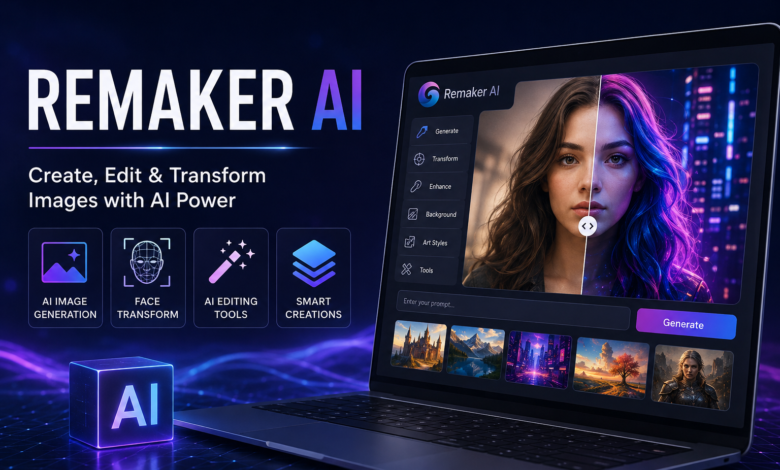
AI image generation is one important area. Users can create visual concepts from text prompts or instructions, making it possible to explore ideas without manually drawing every element. This can be useful for blog graphics, social media concepts, advertisements, presentations, and creative experiments.
Image transformation is another important capability. AI can help change the appearance or composition of existing visuals. Depending on the available tool, users may experiment with faces, backgrounds, styles, and other elements.
The platform can also be useful for people who regularly create online content. Instead of producing every image from scratch, creators can use AI-assisted workflows to develop variations quickly and test different visual directions.
AI Face and Image Transformation
AI-powered face and image transformation has become one of the most recognizable applications of generative technology. Remaker AI has attracted attention partly because users can experiment with this type of content creation.
The underlying concept is relatively simple. An AI system analyzes visual characteristics in one image and attempts to integrate them into another image while maintaining realistic proportions, lighting, and facial structure.
This can be useful for entertainment and creative experimentation. For example, users may want to visualize how a character could look in a different setting or create an imaginative concept for a social media project.
At the same time, responsible use matters. Users should avoid manipulating another person’s image in a deceptive, harmful, or non-consensual way. AI makes image manipulation easier, but that does not remove the ethical responsibilities associated with using someone else’s likeness.
Remaker AI for Content Creators
Content creators constantly need fresh visual material. Whether someone runs a YouTube channel, blog, social media account, or online publication, attractive visuals can improve how content is presented.
Remaker AI can help creators brainstorm and produce visual concepts more quickly. Instead of spending a long time preparing every image manually, a creator can use AI tools to generate initial concepts and then refine the best results.
This is particularly useful during the brainstorming stage. A creator may have an idea but not know exactly how it should look. AI generation can provide several visual directions, helping the creator decide which concept works best.
Still, AI should be treated as a creative assistant rather than a complete replacement for human judgment. The strongest content usually comes from combining AI speed with human editing, storytelling, brand knowledge, and quality control.
Using Remaker AI for Social Media
Social media moves quickly, and users often need visual content on a regular basis. Instagram, Facebook, TikTok, Pinterest, and other platforms rely heavily on images and videos to capture attention.
AI tools can make the production process faster. A creator can experiment with different compositions, visual styles, backgrounds, and concepts without rebuilding every design manually.
For small businesses, this can be particularly useful. A business owner who cannot afford a full-time designer may use AI to develop early concepts for promotional graphics and social posts.
However, good social media content requires more than an attractive picture. The visual needs to match the audience, message, branding, and platform. AI can help create the asset, but humans still need to decide whether the final result actually communicates the intended message.
Remaker AI for Bloggers and Website Owners
Bloggers and website owners can also benefit from AI image tools. A strong featured image can make an article look more professional and can improve the visual presentation of a website.
For example, a blogger writing about technology might need a futuristic AI-themed image. Instead of searching through generic stock photography, the writer can use an AI tool to develop a concept specifically related to the article.
AI-generated visuals can also help websites maintain a consistent creative style. A publisher can experiment with similar compositions and visual themes across different articles.
There is still an important quality-control step. Website owners should check AI-generated images carefully before publishing them. Strange hands, distorted objects, unrealistic text, duplicated features, or other visual errors can make a supposedly professional image look artificial.
Benefits of Remaker AI
One major advantage of Remaker AI is accessibility. Traditional professional editing software can feel overwhelming to beginners because it includes numerous panels, settings, tools, and technical concepts.
AI-based interfaces can simplify that experience. Instead of manually performing every step, users can often start with a much shorter workflow and allow AI to perform complex processing automatically.
Speed is another major benefit. Creating or modifying visual content manually can take considerable time. AI can produce an initial result much faster, which is valuable when users need multiple ideas or variations.
Cost can also be an important consideration. While professional design services and advanced software can become expensive, AI platforms may provide a more accessible option for individuals and small teams. The exact features and pricing available can change, so users should always check the platform’s current terms before relying on a particular plan.
Limitations You Should Know About
Despite the impressive capabilities of AI, Remaker AI is not perfect. Artificial intelligence can sometimes produce unexpected or inaccurate results, especially when the requested transformation is complicated.
Faces may occasionally look unnatural, objects can become distorted, and small details may not match the user’s expectations. Text inside generated images is another area where AI systems have historically struggled.
Another limitation is consistency. Producing one good image may be relatively easy, but producing a large collection of images with exactly the same character, style, and visual identity can be more challenging.
Users should therefore expect an editing process rather than a magic button. The best workflow often involves generating an initial version, reviewing it carefully, changing the instructions, and trying again until the result meets the desired standard.
Is Remaker AI Easy to Use?
The platform is designed to make AI-assisted creation accessible to a broad audience. Users generally do not need extensive knowledge of professional image-editing software to understand the basic workflow.
The biggest learning curve may actually be learning how to communicate with AI. Instructions that are too vague can produce generic results, while clear and specific prompts can give the system more useful direction.
For beginners, starting with simple requests is usually a good approach. Once the basic workflow becomes familiar, users can gradually experiment with more detailed instructions and creative combinations.
The experience can also improve through repetition. As users learn which descriptions produce better results, they become more effective at directing AI systems toward their preferred visual style.
How to Get Better Results From Remaker AI
Good input usually leads to better output. When working with AI image tools, users should think about the subject, setting, lighting, composition, style, and overall purpose of the image.
Instead of giving an extremely short instruction, describe the desired result clearly. Mention important visual characteristics when they matter, such as a professional appearance, realistic lighting, a particular environment, or a specific composition.
Using high-quality source images can also help when an existing image is being transformed. A clear image gives the AI more visual information to work with than a heavily compressed or blurry file.
Finally, do not be afraid to experiment. AI generation is inherently iterative. If the first output is not convincing, adjusting the prompt or source material may produce a significantly better result.
Remaker AI and Professional Design Work
There is sometimes a misconception that AI tools will completely replace graphic designers. In reality, professional design involves much more than generating an image.
Designers understand branding, typography, composition, user experience, communication, visual hierarchy, and audience psychology. These skills allow professionals to make strategic decisions that an AI generator alone cannot reliably make.
Remaker AI can instead function as another tool within the creative workflow. A designer might use AI for brainstorming, concept development, background generation, or early visual exploration before applying professional editing techniques.
For businesses, this combination can be powerful. AI can accelerate repetitive creative tasks while experienced professionals focus on strategy, refinement, and final quality.
Privacy and Responsible AI Use
Whenever users upload personal images to an online AI platform, privacy should be considered. People should understand how their uploaded content is handled and review the platform’s current privacy policy and terms before submitting sensitive material.
This is particularly important for photographs containing other people. Having access to an image does not automatically mean that a person has permission to manipulate or publicly distribute it.
Users should also avoid using AI-generated or transformed images to deceive people. Fake identities, misleading representations, impersonation, and harmful manipulation can create serious personal and legal problems.
Responsible AI use means treating the technology as a creative tool while respecting privacy, consent, copyright, and the rights of other people.
Remaker AI vs Traditional Image Editing
Traditional image editing and AI-assisted editing approach creative work differently. Conventional software gives users precise manual control over individual elements, while AI tools can automate many complicated processes.
For experienced designers, traditional software may remain preferable when pixel-level precision is required. A professional project often needs exact measurements, typography, colors, layers, and carefully controlled compositions.
AI tools are particularly useful when speed and experimentation are more important. They can help users move from an idea to a visual concept without manually constructing every component.
The two approaches do not have to compete. In many modern workflows, AI and traditional editing can work together. AI can produce the starting point, while human editing provides the final polish.
Who Should Use Remaker AI?
Remaker AI can be useful for bloggers, social media creators, marketers, small business owners, students, designers, and people who simply enjoy experimenting with artificial intelligence.
Beginners may appreciate the simplicity because they can explore visual creation without first becoming experts in professional editing software.
Marketing teams can also use AI tools during brainstorming sessions. Generating multiple creative directions quickly can make it easier to compare ideas before investing significant time in final production.
Professional designers may find AI useful as a supplementary tool. It can speed up ideation and repetitive work while leaving the important creative decisions under human control.
The Future of AI Image Creation
AI image technology is developing rapidly. Today’s tools are already capable of generating and transforming visuals that would have required substantial manual effort only a few years ago.
Future systems are likely to become better at maintaining consistency, understanding detailed instructions, preserving important visual characteristics, and producing more realistic results.
This could change how websites, advertisements, social media campaigns, and entertainment projects are produced. Instead of spending most of their time on repetitive production tasks, creators may spend more time developing concepts and improving the overall experience.
The human role is unlikely to disappear. Creativity involves emotion, context, judgment, cultural understanding, and purpose. AI can accelerate production, but people still determine what should be created and why it matters.
Final Thoughts on Remaker AI
Remaker AI represents the broader shift toward accessible artificial intelligence for visual creativity. Its appeal comes from allowing users to experiment with image creation and transformation without requiring advanced technical editing skills.
For bloggers, creators, marketers, and casual users, that accessibility can save time and make visual experimentation more enjoyable. The platform can be especially useful when someone needs to explore several creative ideas quickly.
At the same time, users should maintain realistic expectations. AI-generated content can contain mistakes, and important projects still benefit from human review and professional editing.
Ultimately, the best way to think about Remaker AI is as a creative assistant. It can help turn ideas into visual concepts quickly, but the quality of the final result still depends heavily on the user’s direction, judgment, and willingness to refine the output.